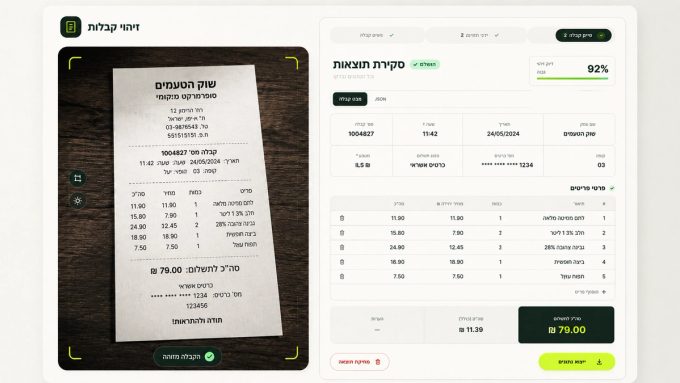
Receipt recognition becomes much more difficult when there is no consistent visual layout to rely on. In Israel, this is a particularly relevant challenge: receipts from different businesses and systems can vary significantly in structure, field placement, fonts, and data formats. The date, total, payment method, or line items may appear in different places from one document to another.
In one of our projects for an Israeli consulting company, we needed to solve this without creating a separate recognition template for every format. We built a prototype around a multimodal LLM that could read receipts and other incoming documents and return the extracted information as structured data for further processing.
Working with inconsistent documents and imperfect images
The system needed to extract specific information rather than simply transcribe the document: merchant details, date and time, receipt number, currency, payment method, line items, and totals. The inputs were inconsistent in more than one way. Even similar receipts could use different layouts, fonts, spacing, and field positions, while some also contained handwritten notes that had to be captured alongside the printed text.
Image quality added another layer of complexity. Instead of clean, consistently scanned documents, the system had to work with photos of varying quality and taken from different angles. That meant the recognition process had to account not only for different document structures, but also for inconsistent source images.
Why fixed templates were not enough
When documents follow a stable structure, data extraction can rely partly on predefined rules — for example, looking for a total or date in a particular area of the page. That approach did not fit this case because the same type of information could appear in different places depending on the receipt or ticket format.
Building and maintaining separate rules for every layout would have been difficult to scale, so we needed an approach that could extract the required information without relying on fixed coordinates for each field.
Preparing the image before recognition
Before recognition, each image went through a preprocessing step: 3.0× high‑quality upscale, conversion to grayscale, and a light contrast adjustment. This helped prepare low‑resolution or difficult‑to‑read images before passing them to the model.
The processed image was then sent to a multimodal LLM that works directly with visual input. Instead of first producing raw text and then relying on a separate set of extraction rules, the model analyzes the document in context and extracts the required fields directly.
In the prototype, the system identified merchant information, date and time, receipt number, currency, payment method, individual items, quantities, prices, and totals. Handwritten notes were also included in the recognition results, which was important because they could appear on the same image as the printed content.
From recognition to structured data
Reading the text was only part of the task. The result also had to be useful beyond the recognition screen, so the extracted information was organized into separate fields and line items rather than returned as one block of text.
Users can review the result, correct individual values if necessary, and export the data. The structured output is also available as JSON, which means it can be passed into other systems without manually parsing the recognized text first.
This makes document recognition part of a broader workflow rather than an isolated feature. For example, the same approach could be used to process supplier invoices and receipts before passing the extracted data into internal business systems.
What the prototype showed
The same approach worked across documents with different structures and image quality, including receipts with handwritten notes, without requiring a separate template for every format.
More importantly, the output is not simply text pulled from an image. It is structured, editable data that can be reviewed and then passed further into a business process, turning document recognition into a practical first step in a larger automation workflow.
Have a similar challenge with document processing or inconsistent input data in your product? Tell us about it, and we can discuss whether AI could simplify the workflow.